
A product grid that helps people compare.
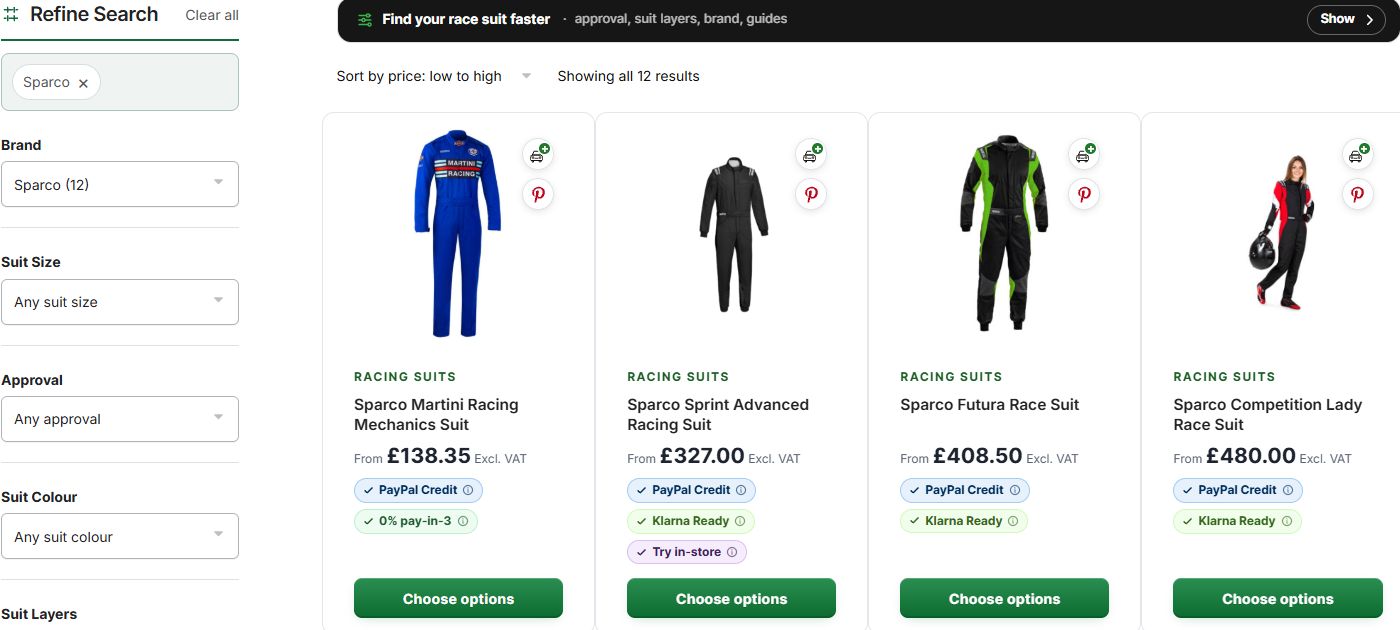
Product Card Design · Shelfview. A shop-grid redesign with bordered product cards, price-first hierarchy and ribbon labels rebuilt as chips.
Managed build. Scoped first, then a fixed quote.

A more useful journey.
A shopper comparing similar products can scan their prices and labels without decoding a different layout on each card.
Recognise the product
A considered card layout gives the catalogue a consistent shape.
Find the price
Price-first hierarchy keeps a key comparison detail visible.
Read the useful label
Ribbon messages become clearer chips within the card.
Illustrative use case based on the reference build. Configuration depends on your site.
What it does.
A shop-grid redesign with bordered product cards, price-first hierarchy and ribbon labels rebuilt as chips.
This is a reference client build. We review your site, catalogue and existing integrations before quoting an equivalent setup. The scope confirms compatibility, configuration, testing and ongoing maintenance.
- Price-first hierarchy
- Product-card layout
- Ribbon labels presented as chips
Your site. An agreed setup.
Check long product names, sale prices, unavailable items and variation ranges. The redesign packages a site-specific grid rather than changing product data.
How to get started
Show us the workflow
Check the requirements below. Send your website, current tools and the task you want to improve.
Agree the scope and quote
We confirm the integration, configuration, testing and support before work starts.
Test the complete journey
Review the example above against your own data. Check the relevant customer or staff journey before launching.
Build & installation details
- Installed plugin name
- GSM Product Card Redesign
- Reference build
- v1.0.10
- Requirements
- WordPress, WooCommerce and a scoped compatibility review
- Delivery
- Managed setup agreed with you
Before you get started.
Answers about the build, the setup and what to check.
Can I download this as a standard plugin?
This build is supplied as a scoped project. Send us your site and requirements so we can confirm what can be reused and what needs adapting.
What should I check before using this?
Check long product names, sale prices, unavailable items and variation ranges. The redesign packages a site-specific grid rather than changing product data.
How is this supplied?
This is a managed reference build. We review your site, agree the integration and support, and provide a fixed quote before work starts.
Will it work with my current setup?
The catalogue requirements are WordPress, WooCommerce and a scoped compatibility review. Check your theme, connected plugins and the workflow described above. Send us your site and the integrations you use if you need a compatibility review.
Is this part of the Penguin Toolkit?
This managed client or service build is supplied separately from the Toolkit subscription. We agree its delivery and support in the service scope.
Useful reading
Official WordPress and WooCommerce guides to the underlying tasks. These cover the platform, rather than this plugin’s configuration.
Keep the journey moving
Related plugins for the next part of your workflow.
 Product Labels · ShelfmarkProduct badges with rules, not repetitive admin.
 Product Filtering · ShortlistFast catalogue filters with old links preserved.
 Checkout Address Lookup · DoorstepFind an address as your customer types.