
Put a face to your business.
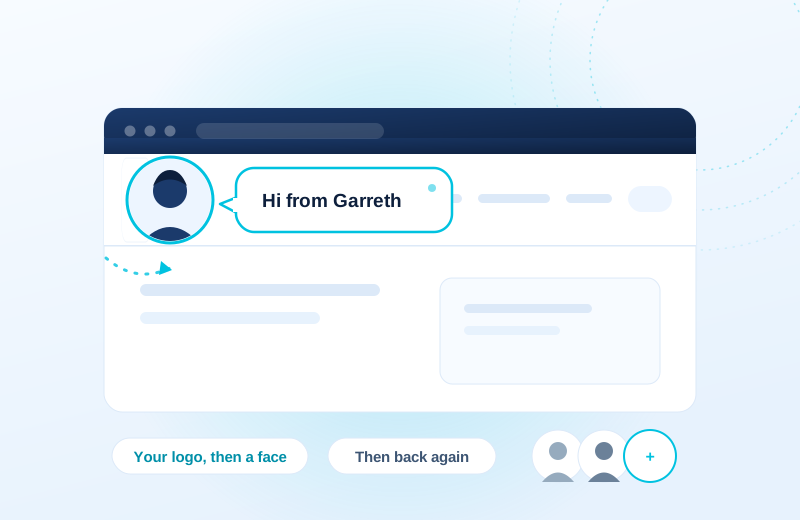
Logo Animator · Faceflip. The site logo turns over into a photo of you or your team with a short hello, then turns back. Small touch, and people notice it.
£1.50/month or £8.99/year
A more useful journey.
A first-time visitor sees the logo briefly introduce the shop owner with a short hello. Returning visitors see it according to the frequency you choose.
Meet the team
Choose a real team photo and a short greeting from the media library.
Let the logo introduce you
The configured flip reveals the person behind the business, then returns to the logo.
Keep it considerate
Set the frequency and delay, preview the result and honour reduced-motion preferences.
Illustrative use case based on the reference build. Configuration depends on your site.
What it does.
Online shops all look the same from the front. A logo, a menu, a row of products. Nothing tells the customer there are actual people behind it.
This flips the logo over to a photo of someone on the team with a line like "Hi from Garreth", holds it a moment, then flips back. We run it on our own stores because it makes the shop feel like it belongs to somebody. Add as many people as you like, each with their own photo, message and link.
- Add your team from the media library, each with a name, a message and an optional link
- Choose how often it plays: once a visit, once a day, once a week, or every page
- Set the delay, how long each face holds, and the bubble colour
- Skips itself for anyone who has asked their device to reduce motion, and can be turned off on phones
- Live preview on the settings page, so you can see it before it goes out
Choose the plan. Check the fit.
Use approved team photos and check your theme’s logo selector. Preview on phones before deciding whether to enable the effect there.
How to get started
Review your setup
Check the requirements below. Keep a backup and prepare a staging copy before installation.
Choose monthly or annual
Subscribe for the ZIP download, updates and support while your subscription is active.
Test the complete journey
Review the example above against your own data. Check the relevant customer or staff journey before launching.
Build & installation details
- Installed plugin name
- FP Logo Animator
- Catalogue version
- v1.0.7
- Requirements
- WordPress 6.0+, WooCommerce not required
- Delivery
- Plugin ZIP download
Before you get started.
Answers about the build, the setup and what to check.
Will it slow the site down?
No. Nothing loads at all unless it is switched on with at least one photo, the photos are fetched after the page has drawn, and the logo is measured first so nothing shifts around.
Does it work with my theme?
It targets the standard WordPress logo, which covers most themes. If yours is unusual there is a box on the settings page for the logo selector.
Do I need WooCommerce?
No. It works on any WordPress site, shop or not.
What should I check before using this?
Use approved team photos and check your theme’s logo selector. Preview on phones before deciding whether to enable the effect there.
How is this supplied?
Subscribe monthly or annually, then download the plugin ZIP. Updates and support are available while subscribed. Test the setup before replacing an existing plugin.
Will it work with my current setup?
The catalogue requirements are WordPress 6.0+, WooCommerce not required. Check your theme, connected plugins and the workflow described above. Send us your site and the integrations you use if you need a compatibility review.
Is this part of the Penguin Toolkit?
Yes. The Toolkit covers subscribable plugins for up to five stores. An individual subscription covers one store.
Useful reading
Official WordPress and WooCommerce guides to the underlying tasks. These cover the platform, rather than this plugin’s configuration.
Keep the journey moving
Related plugins for the next part of your workflow.
 Social Links · LinklineSocial profiles and product sharing without the tracking baggage.
 Reviews & Social Feeds · Word of MouthBring reviews and social content into your own site.
 Product Tabs · ChapterCustom product tabs, maintained.