
Websites & support / Behind the scenes
D&G Roofing: a Derby website that puts the roof work in view
D&G Roofing is based in Alvaston and works across Derby and the surrounding area. We built its website. The public page introduces Dan, explains the roofing services and shows photographs of work on roofs around the area.
A roof can be difficult for a homeowner to describe. They may have noticed a leak without knowing which part needs attention. I want a website like this to give them a useful starting point for that conversation.
Give repairs and larger jobs their own place
The service section separates roof repairs from full reroofs and new-build work. It also covers flat roofs, chimneys and lead work, with other roofline services listed individually.
Those labels let a visitor begin with the job they recognise. Someone asking about a slipped tile can find the repair section. Someone planning an extension can see that new-build roofs are part of the offering.
For a trade website, I like to settle these distinctions before getting absorbed in the page styling. They affect the headings people scan and the examples we should put nearby.
Source: D&G Roofing: public website
Show the work where the customer cannot usually see it
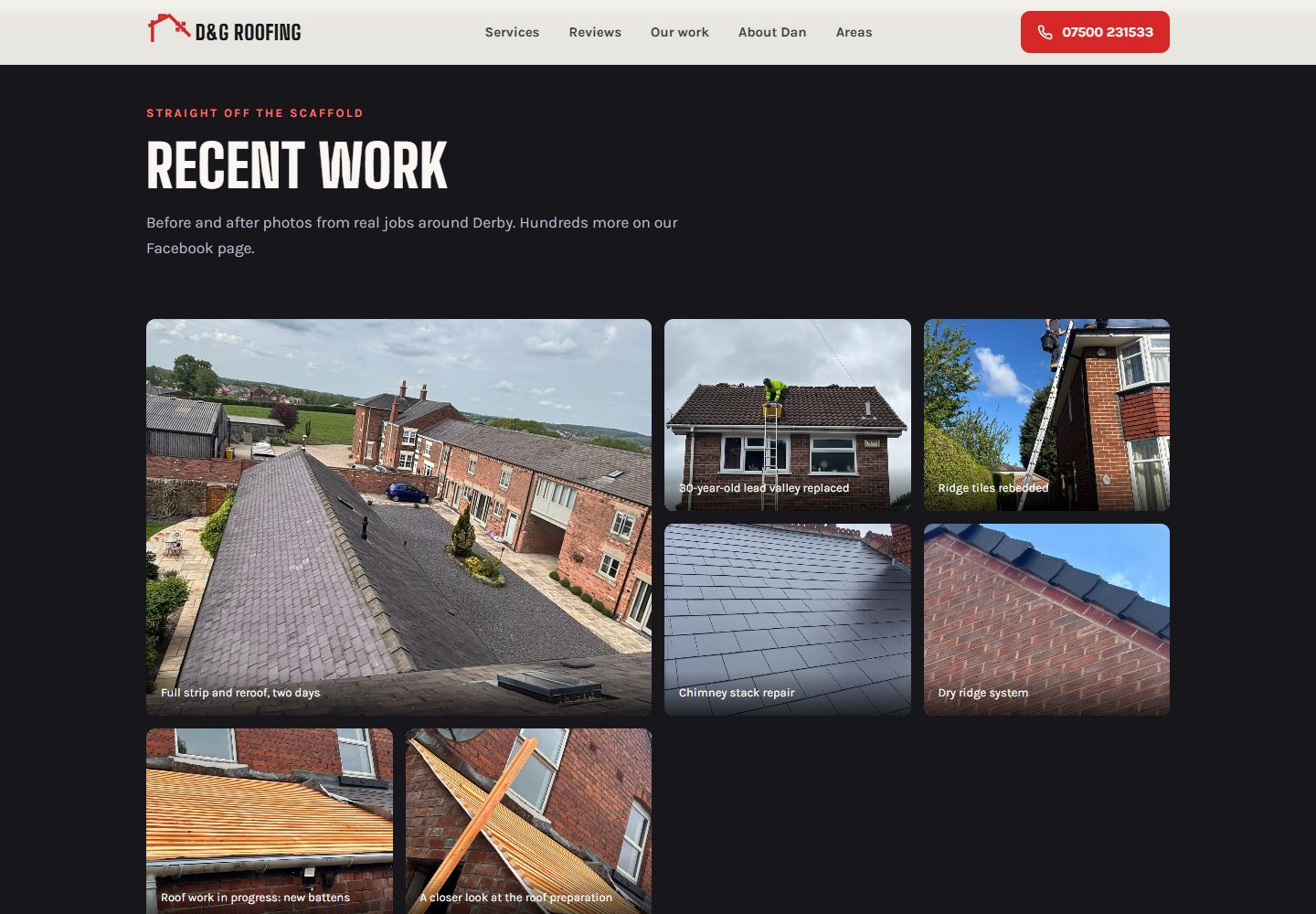
The recent-work section shows roof surfaces, chimney work and preparation photographs together. The captions describe what each picture is showing, giving a visitor some context for the details.
That is particularly useful for roofing. Most people cannot inspect their own roof closely from the ground. A photograph of battens or a roof detail gives the service description something visible to connect to.
The gallery links onward to the business’s Facebook photographs. The website provides a selection within the main page, and the visitor can follow that route if they want to look further.
Source: D&G Roofing: public website
Keep the first enquiry straightforward
The page gives visitors direct phone and Facebook routes. Its process section asks them to describe the problem and send a photograph if they can.
A photo can give a roofer context for the conversation, alongside the customer’s description. The customer should use a view they can take safely; the website does not need somebody climbing up to produce a better picture.
The business can then discuss the next step. The contact route and the information requested on the page help start that exchange, without asking the visitor to diagnose a roofing fault themselves.
Let the local business be recognisable
Dan appears by name, and the page lists Alvaston and other Derby areas within its coverage. The red and black design carries through the service headings, navigation and phone button.
For a local firm, those details matter together. A visitor can see the type of work, whether the business covers their area and who the page is introducing.
I enjoy making that information clear for a small business. The photographs and service explanations are specific to the work people are asking about, so the page has something useful to say before an enquiry begins.
Collect the details that explain a job
If you are planning a trade website, keep photographs of the stages as well as the finish. A clear caption can explain why a close-up belongs in the gallery.
Choose examples for the services you want the next customer to understand. We can use them to build a page that gives somebody a better starting point for asking about their own work.
Sources
Checked on 23 October 2026.
- D&G Roofing: public website
Current roofing service range, public introduction to Dan, Alvaston location, coverage, recent-work gallery and phone/Facebook routes. Its footer credits Flying Penguin for the website build.