
From customer order to supplier action.
Supplier Order Manager · Supplydesk. PDF purchase orders emailed to suppliers from the order screen, dispatch planning, and automatic chasing. Installed and configured for you.
£11.99/month or £119/year Early access.
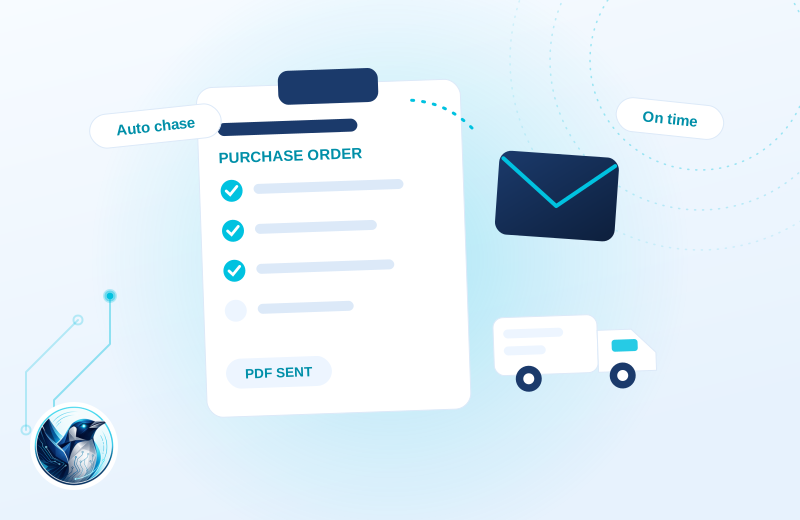
A clearer workflow.
A customer order contains items from different suppliers. Your team keeps each supplier order and its progress with the purchase, then plans dispatch around what is available.
Prepare the supplier order
Create the purchase-order paperwork from the WooCommerce order.
Follow each supplier
Track supplier progress with chase, track and cancel actions.
Plan the dispatch
Use warehouse views to decide what is ready and what still needs attention.
Illustrative use case based on the reference build. Configuration depends on your site.
What it does.
Once a store drop-ships or orders in from suppliers, WooCommerce runs out of road. Purchase orders live in email threads, chasing suppliers is a memory game, and dispatch planning happens on paper.
Order Manager grew inside our own motorsport group, feature by feature, around how a real warehouse day works. Supplier POs go out as PDFs straight from the order screen, every order shows what has been ordered and chased, and overdue suppliers get chased automatically if you want them to be.
It is the deepest plugin we have, which is why the subscription includes us installing and configuring it around your suppliers rather than handing you a zip.
- PDF purchase orders emailed to suppliers from the order screen
- Per-supplier order tracking with chase, track and cancel actions
- Dispatch planning views for the warehouse
- Optional automatic chasing of overdue supplier orders
- Installed and configured around your suppliers by us
Moving from Spreadsheets, email threads and paper pick lists?
Review existing data and settings on a staging copy, keep a backup and test your important journeys before switching. Supplier details, email wording and any automatic chasing rules are configured and tested with you. Automation should follow your agreed purchasing process.
Choose the plan. Check the fit.
Supplier details, email wording and any automatic chasing rules are configured and tested with you. Automation should follow your agreed purchasing process.
How to get started
Show us the workflow
Check the requirements below. Send your website, current tools and the task you want to improve.
Choose monthly or annual
Subscribe, then we coordinate the installation and connection with you.
Test the complete journey
Review the example above against your own data. Check the relevant customer or staff journey before launching.
Build & installation details
- Installed plugin name
- FP Order Manager
- Catalogue version
- v0.45
- Requirements
- WordPress 6.0+, WooCommerce 7.0+
- Delivery
- Managed setup agreed with you
Before you get started.
Answers about the build, the setup and what to check.
Why early access?
It has run our own stores for months, but every business orders differently, so we set each new store up personally and shape the rough edges as we go. Early access pricing reflects that.
What does setup involve?
A short call about how you order from suppliers, then we install it, load your suppliers and templates, and stay close for the first weeks.
What should I check before using this?
Supplier details, email wording and any automatic chasing rules are configured and tested with you. Automation should follow your agreed purchasing process.
How is this supplied?
This subscription includes a managed installation. We agree the connection and configuration with you before launching it on the store.
Will it work with my current setup?
The catalogue requirements are WordPress 6.0+, WooCommerce 7.0+. Check your theme, connected plugins and the workflow described above. Send us your site and the integrations you use if you need a compatibility review.
Is this part of the Penguin Toolkit?
Yes. The Toolkit covers subscribable plugins for up to five stores. An individual subscription covers one store.
Useful reading
Official WordPress and WooCommerce guides to the underlying tasks. These cover the platform, rather than this plugin’s configuration.
Keep the journey moving
Related plugins for the next part of your workflow.
 Order Documents · PapertrailThe paperwork that belongs with every order.
 Parcel Tracking · ParcelpathKeep tracking and delivery updates with the order.